Track time directly in the case file.
Running timer, categories, and automatic transfer to RVG billing — so no billable minute is lost.
Does this sound familiar?
Time tracking on paper or in separate tools that never sync with billing. At month-end, hours are missing, clients question invoices, and manual reconciliation takes more time than the tracking itself.
How LexA time tracking works
Timer directly in the case
Start the timer with one click from the sidebar. Time is automatically assigned to the active case.
Categories & billing status
Assign time entries to categories: Consultation, Drafting, Court, Research, Admin. Track status: Unbilled, Billed, Written off.
Automatic RVG transfer
Tracked time flows directly into invoicing. Hourly rates are configured per user.
Team overview
See all team members' tracked time at a glance. Filter by case, user, period, or billing status.
See it in action
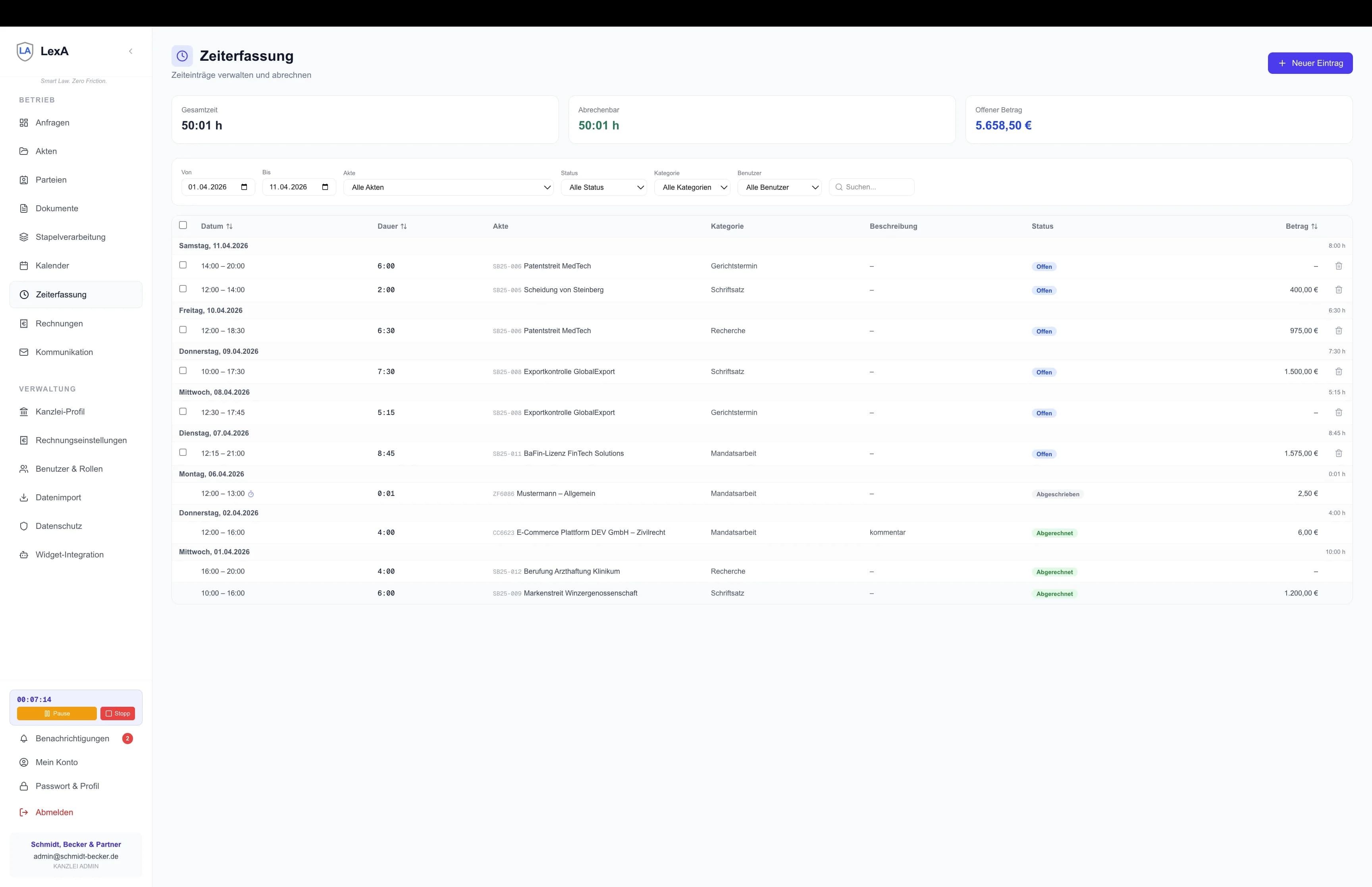
Example from daily practice
Without integrated time tracking
Cases are billed with 'approx. 3 hours' when 4.5 hours were actually worked. The Excel spreadsheet is two weeks old.
With LexA Time Tracking
Timer runs automatically. At end of day, all time is captured, categorized, and assigned to cases. Monthly billing is done in minutes.
Ready to transform your firm?
Start with LexA now and experience the difference. 14 days free, no credit card required.